Elevate Your Shipments with Editable Canva Labels
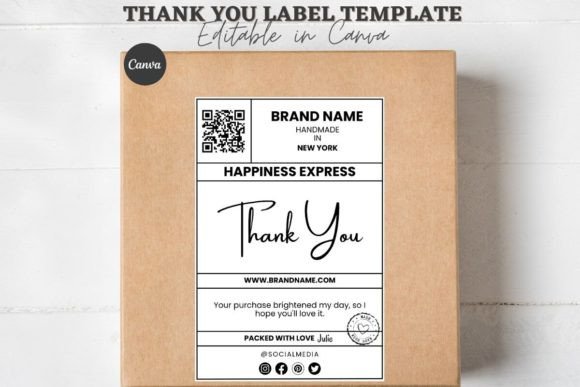
Imagine unboxing a package where the exterior itself feels curated and personal. For small businesses and creative sellers, that first physical touchpoint is a powerful moment. An Editable Shipping Packaging Canva Label template is a versatile design asset that transforms standard parcels into branded experiences, helping you make a memorable impression before the product inside is even revealed.
Beyond Basic: The Creative Value of Custom Packaging
Effective packaging design is a key component of modern brand identity. It’s not just about protecting an item; it’s an extension of your visual story. Using a customizable template allows you to maintain consistency across all customer interactions. Whether your brand aesthetic is minimalist, bold, or whimsical, you can craft box seal stickers and thank you labels that reflect your unique style. This level of detail elevates perceived professionalism and builds customer trust, turning a simple shipment into a thoughtful touchpoint.
Practical Use Cases for Your Brand
The applications for these editable templates are incredibly diverse, fitting seamlessly into various creative projects. Consider how they can enhance your workflow:
- E-commerce & Small Business Shipping: Create cohesive box packaging stickers for every order, reinforcing your brand identity from warehouse to doorstep.
- Gift & Subscription Boxes: Design bespoke box labels for curated kits, adding a premium, handmade feel that subscribers love.
- Event & Wedding Favors: Craft elegant thank you stickers for party favors or bridal gifts, ensuring every detail matches your event’s theme.
- Product Launches & Limited Editions: Generate excitement with special edition packaging stickers that highlight exclusivity and attention to detail.
These design assets are perfect for more than just boxes. Use them for sealing mailers, decorating tissue paper, or even as part of your social media graphics for unboxing content, creating a visually consistent narrative across all platforms.
Tips for Choosing and Using Your Template
To get the most out of your editable label, keep a few practical tips in mind. First, always consider readability. The most stylish script or serif font won’t work if customers can’t easily read the “Thank You” or your website URL. Test the text at a small size to ensure clarity.
Next, match the mood to your project. A modern sans serif typeface suits clean, contemporary brands, while a handwritten font adds a warm, personal touch. Don’t hesitate to experiment with font pairings within the template—combining a display font for headlines with a simple body font can create beautiful typographic hierarchy.
Finally, review the license of any commercial font or asset included. Ensure your use, whether for client work or product sales, is fully covered. A well-chosen template streamlines your process, letting you focus on creativity rather than technical setup.
Enhancing Professional Presentation
The right typography and design elements are fundamental to strong visual communication. A cohesive look across your packaging, logo, and digital presence strengthens brand recognition. Using a high-quality, editable Canva template means you have a professional design foundation that is flexible and easy to update. This adaptability is crucial for seasonal promotions, product line expansions, or evolving brand aesthetics.
Ultimately, investing in thoughtful packaging design is an investment in your customer’s experience. It signals care, quality, and a brand that values presentation. By starting with a customizable and well-designed template, you empower yourself to create shipping materials that are not only functional but also a genuine extension of your creative vision, making every delivery feel intentionally crafted.